Usage
Platform Overview
actsense is a comprehensive security auditing platform for GitHub Actions that helps you identify vulnerabilities, analyze dependencies, and secure your CI/CD pipelines.
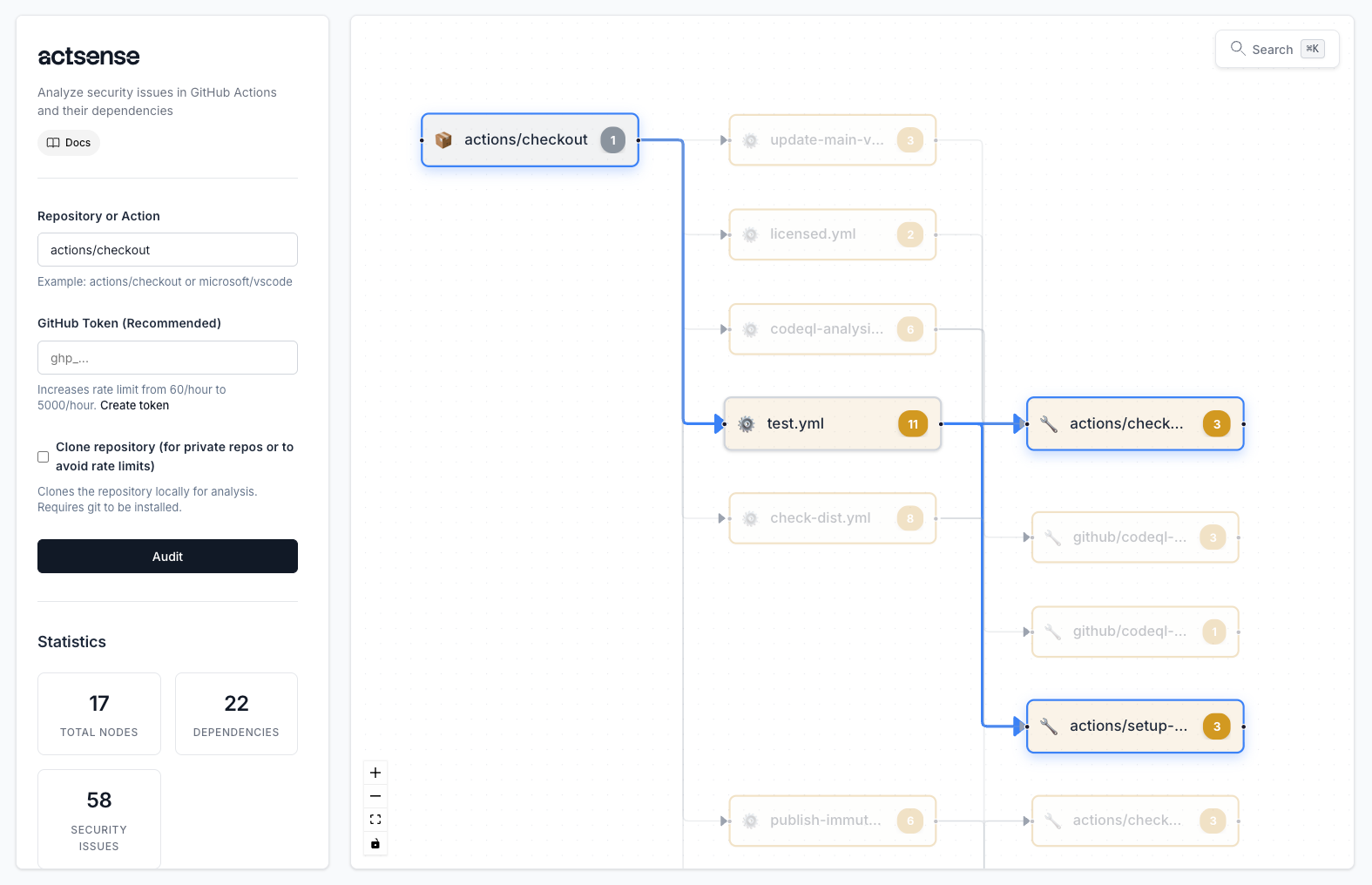
The actsense platform provides a comprehensive view of your GitHub Actions security posture with interactive visualizations and detailed analysis.
What actsense Does
actsense provides a powerful, interactive platform for analyzing GitHub Actions workflows and their dependencies. Here’s what it does:
Comprehensive Security Auditing
actsense performs deep security analysis of your GitHub Actions workflows, detecting ~70 types of security vulnerabilities and exposures including:
- Action Security: Unpinned versions, outdated actions, unpinnable actions (Docker, composite, JavaScript)
- Access Control: Overly permissive permissions, token security, branch protection bypass
- Secrets & Credentials: Hardcoded secrets, long-term credentials, environment security
- Workflow Security: Dangerous events, code injection, script injection, input validation
- Runner Security: Self-hosted runner risks, network isolation, exposure prevention
- Supply Chain: Untrusted actions, typosquatting, deprecated actions, missing repositories
Interactive Graph Visualization
Visualize your workflow dependencies in an interactive graph that shows:
- Repository nodes: Your GitHub repositories
- Workflow nodes: Individual workflow files
- Action nodes: All actions used in your workflows
- Dependency edges: Relationships between components
- Security indicators: Color-coded severity levels (critical, high, medium, low)
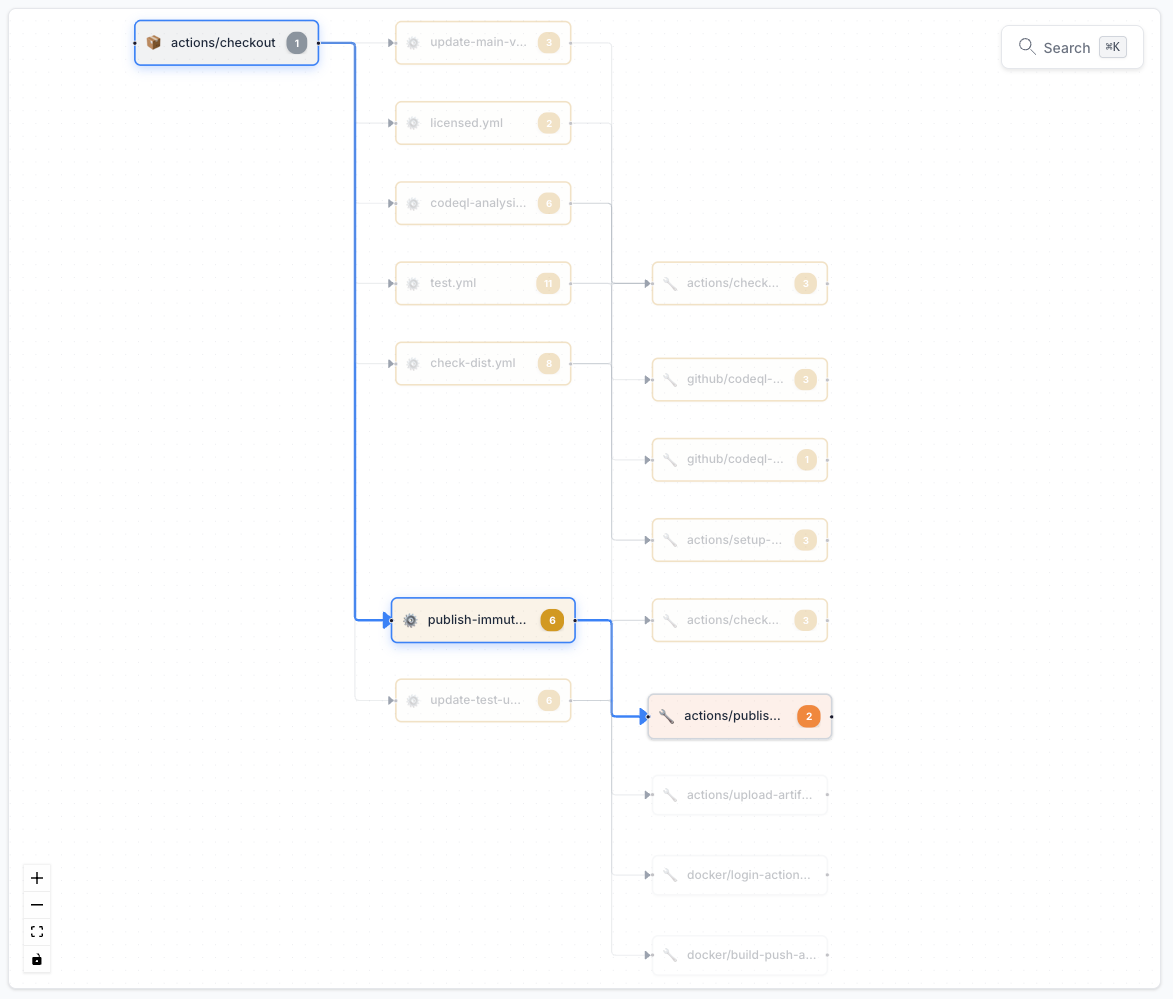
The dependency graph provides a visual representation of your workflow structure, making it easy to understand relationships and identify security issues at a glance. Nodes are color-coded by severity level, helping you quickly spot critical issues.
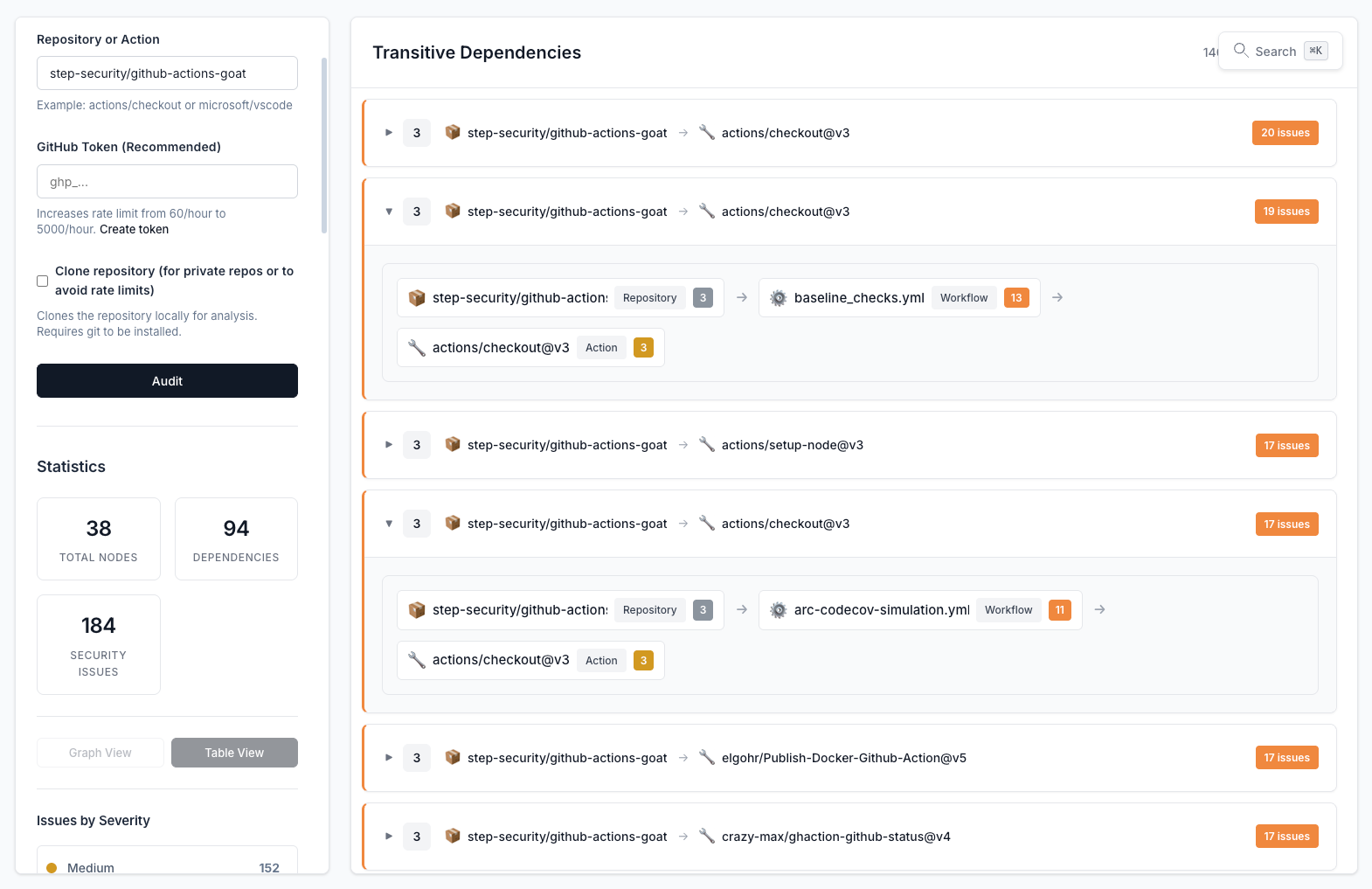
The dependency map shows the complete relationship between repositories, workflows, and actions, helping you understand your CI/CD supply chain.
Click on any node to see detailed security issues, evidence, and mitigation strategies.
Statistics Dashboard
Get an instant overview of your security posture with comprehensive statistics and metrics.
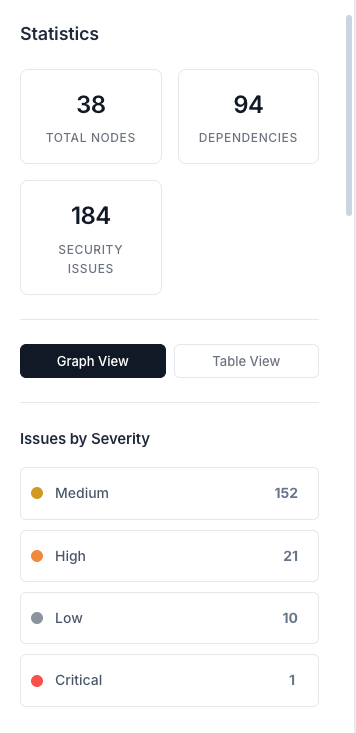
The statistics dashboard provides key metrics at a glance: total nodes, dependencies, and security issues. The severity breakdown helps you prioritize fixes, with color-coded indicators for critical, high, medium, and low severity issues. Click on any metric to filter and explore specific areas.
The dashboard shows:
- Total Nodes: All repositories, workflows, and actions in your analysis
- Total Dependencies: Number of dependency relationships
- Total Security Issues: Count of all detected vulnerabilities
- Severity Breakdown: Issues categorized by severity level (critical, high, medium, low)
- View Mode Toggle: Switch between graph and table views
Powerful Search & Filtering
Search across all nodes, issues, and dependencies with natural language queries.
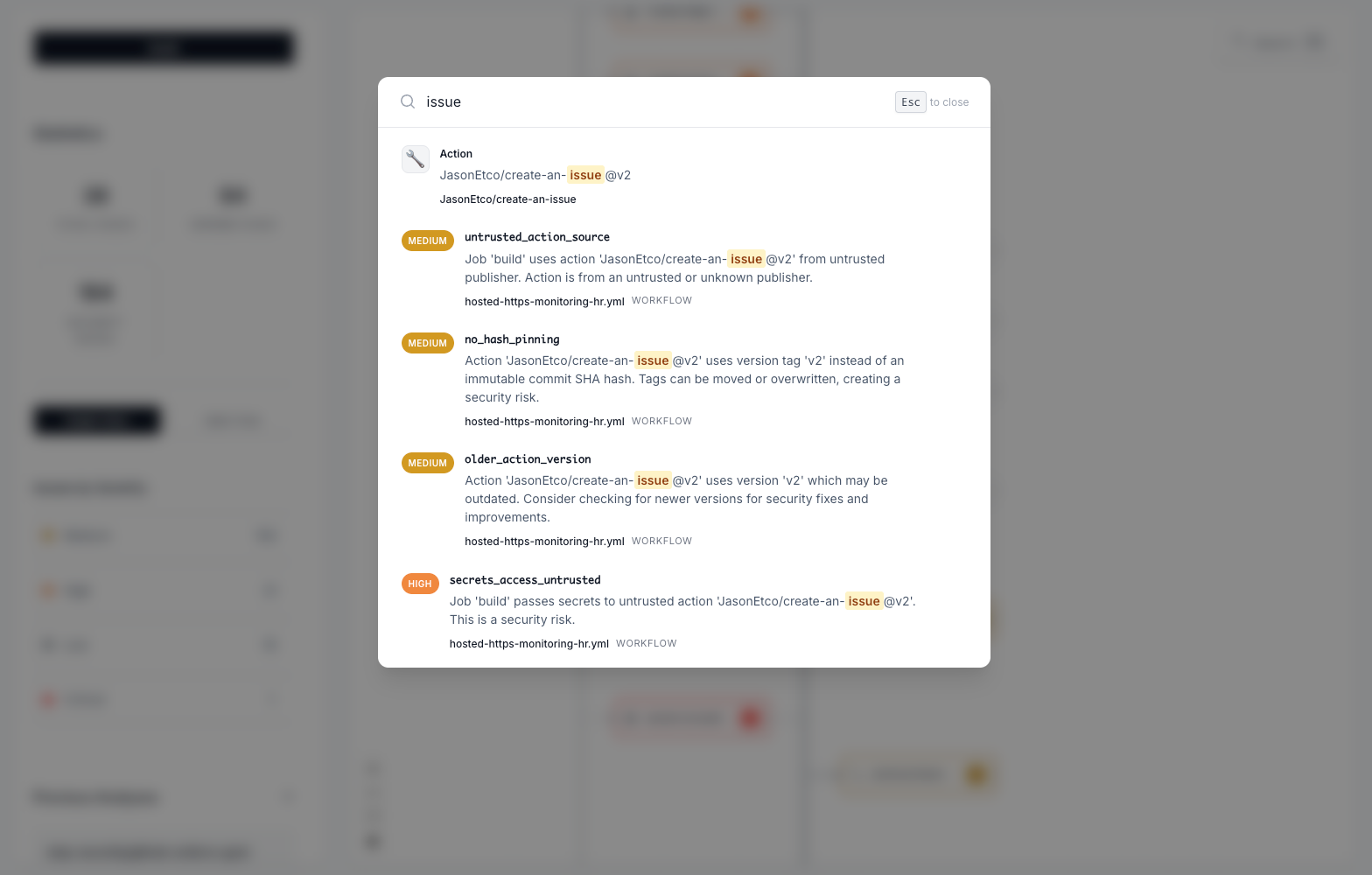
Press Cmd+K (Mac) or Ctrl+K (Windows/Linux) to open the powerful search interface. Search for specific issues, nodes, or actions to quickly find what you’re looking for.
- Natural language search: Use Cmd+K (Mac) or Ctrl+K (Windows/Linux) to search for issues and assets
- Filter by severity: Focus on critical or high-severity issues
- Table views: View nodes and dependencies in organized table formats
- Transitive dependency analysis: Automatically resolves and audits all action dependencies
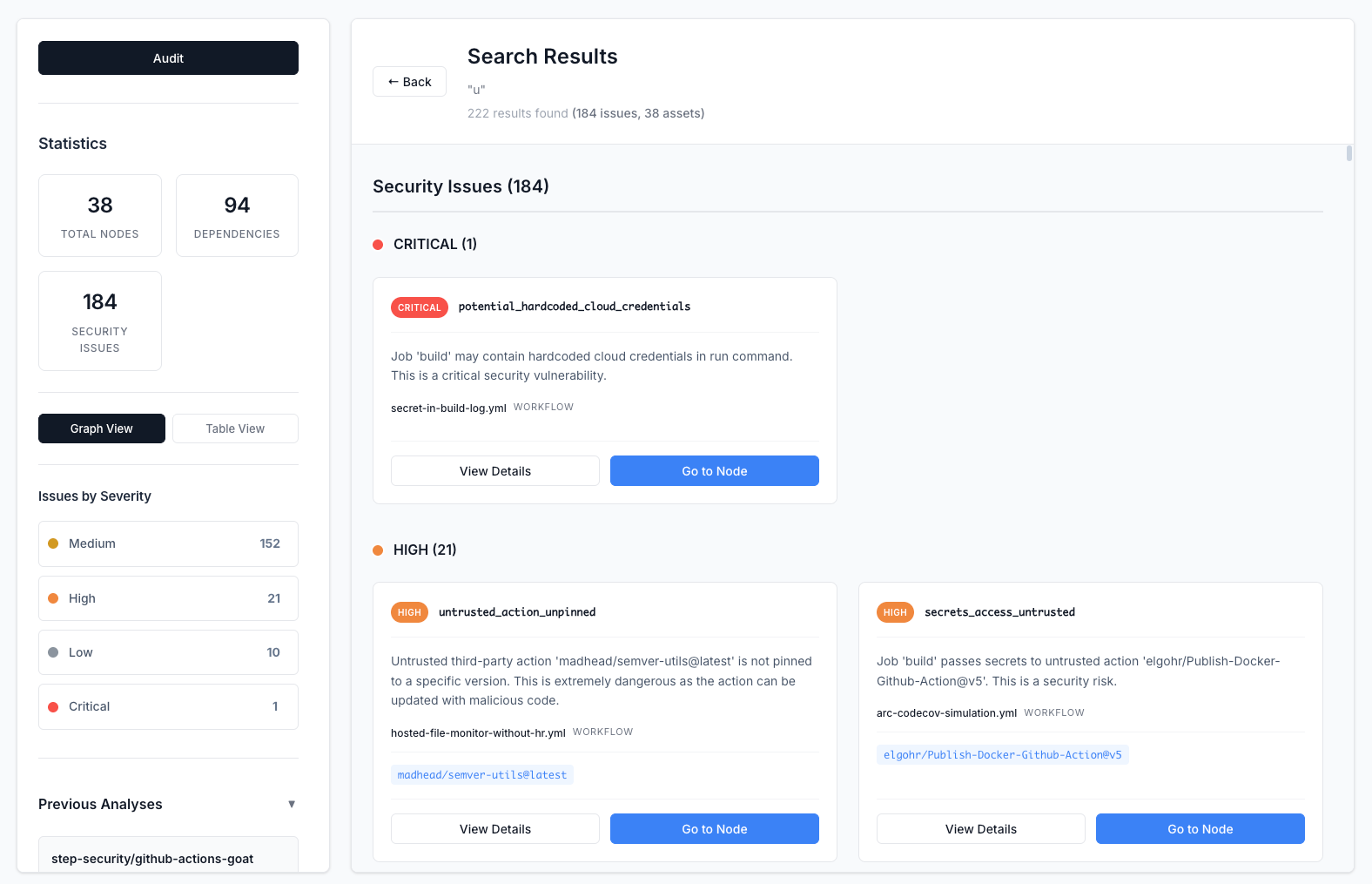
The search results page provides a comprehensive view of all matching results, organized by type. Click on any result to view detailed information.
Table Views
View your data in organized table formats for detailed analysis and reporting.
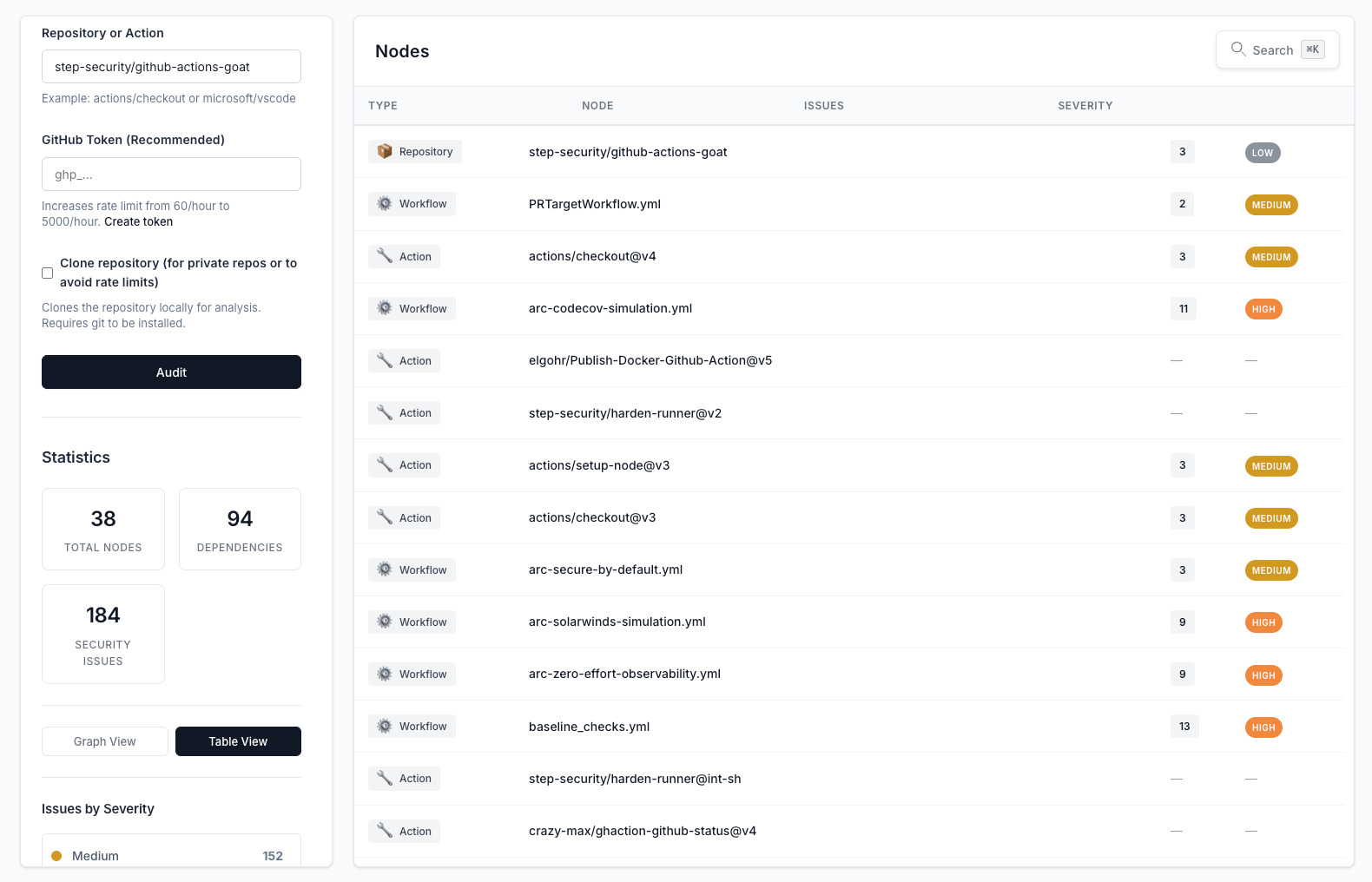
The nodes table provides a structured view of all components (repositories, workflows, and actions) with their associated security issues. Sort and filter to focus on specific areas of concern.
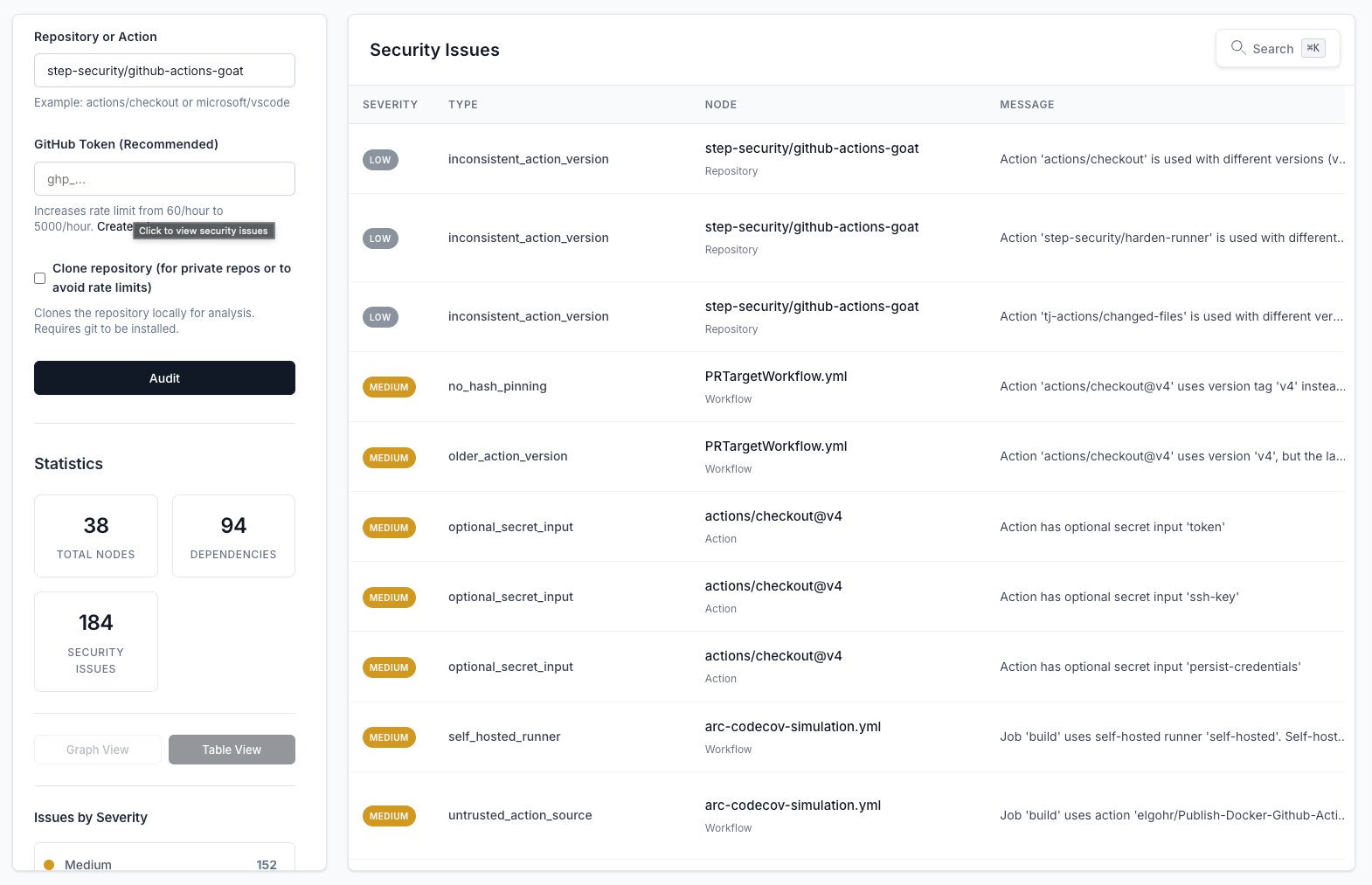
The security issues table gives you a comprehensive inventory of all detected vulnerabilities. Filter by severity, sort by type, and click to view detailed information about each issue.
Table views provide:
- Organized data: Sortable and filterable columns
- Quick scanning: See all issues or nodes at once
- Detailed information: Access full details with a single click
- Export-ready: Perfect for reporting and documentation
Node Details Panel
Drill down into specific components to see detailed information and security issues.
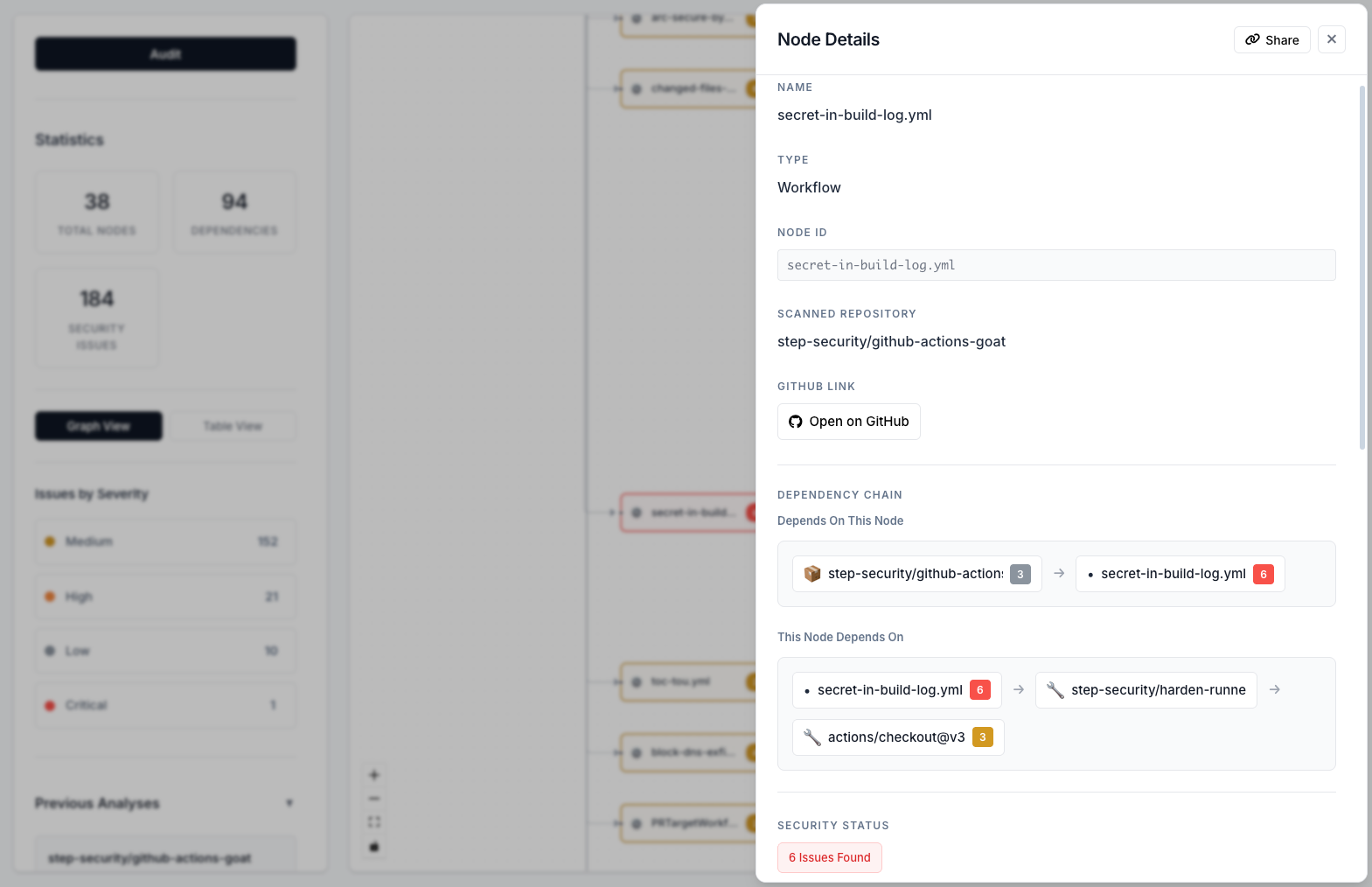
Click on any node in the graph to open the details panel. View all security issues associated with that component, see its dependencies and dependents, and access GitHub links for further investigation.
The node details panel shows:
- Component information: Type, name, and metadata
- Security issues: All vulnerabilities found in this component
- Dependencies: What this component depends on
- Dependents: What depends on this component
- GitHub links: Direct links to source code
- Share functionality: Share specific nodes with your team
Issue Details Modal
Get comprehensive information about each security vulnerability with actionable remediation guidance.
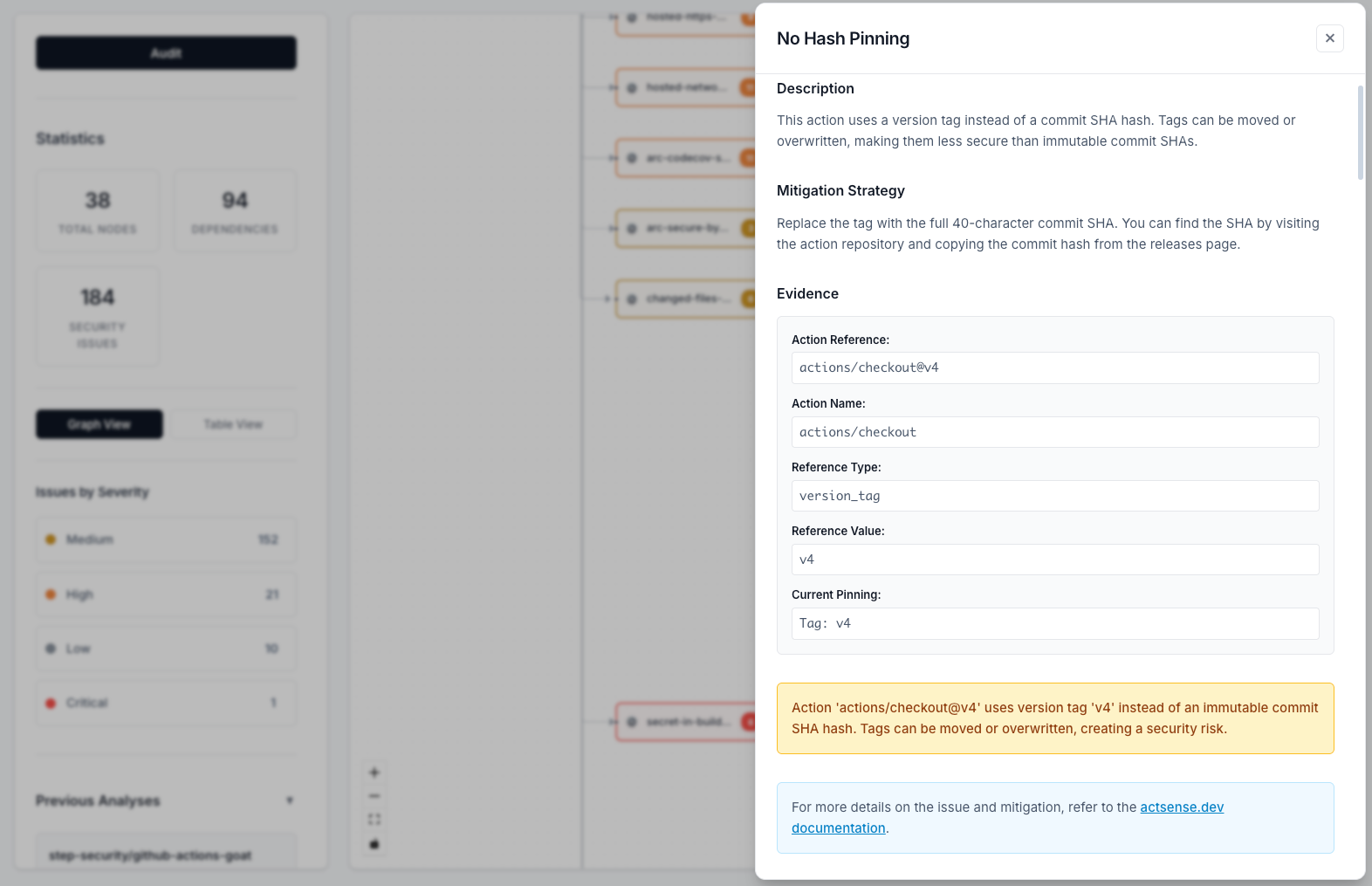
Click on any security issue to view detailed information including evidence, recommendations, and links to comprehensive documentation. Each issue includes step-by-step mitigation strategies to help you fix the problem.
Each issue includes:
- Issue description: Clear explanation of the vulnerability
- Evidence: Specific details about where and how the issue was found
- Line numbers: Exact locations in workflow files (when available)
- Recommendations: Step-by-step guidance on how to fix the issue
- Documentation links: Deep links to comprehensive vulnerability documentation on actsense.dev
- Other instances: See if the same issue appears elsewhere
Share Functionality
Share analysis results with your team for collaboration and reporting.
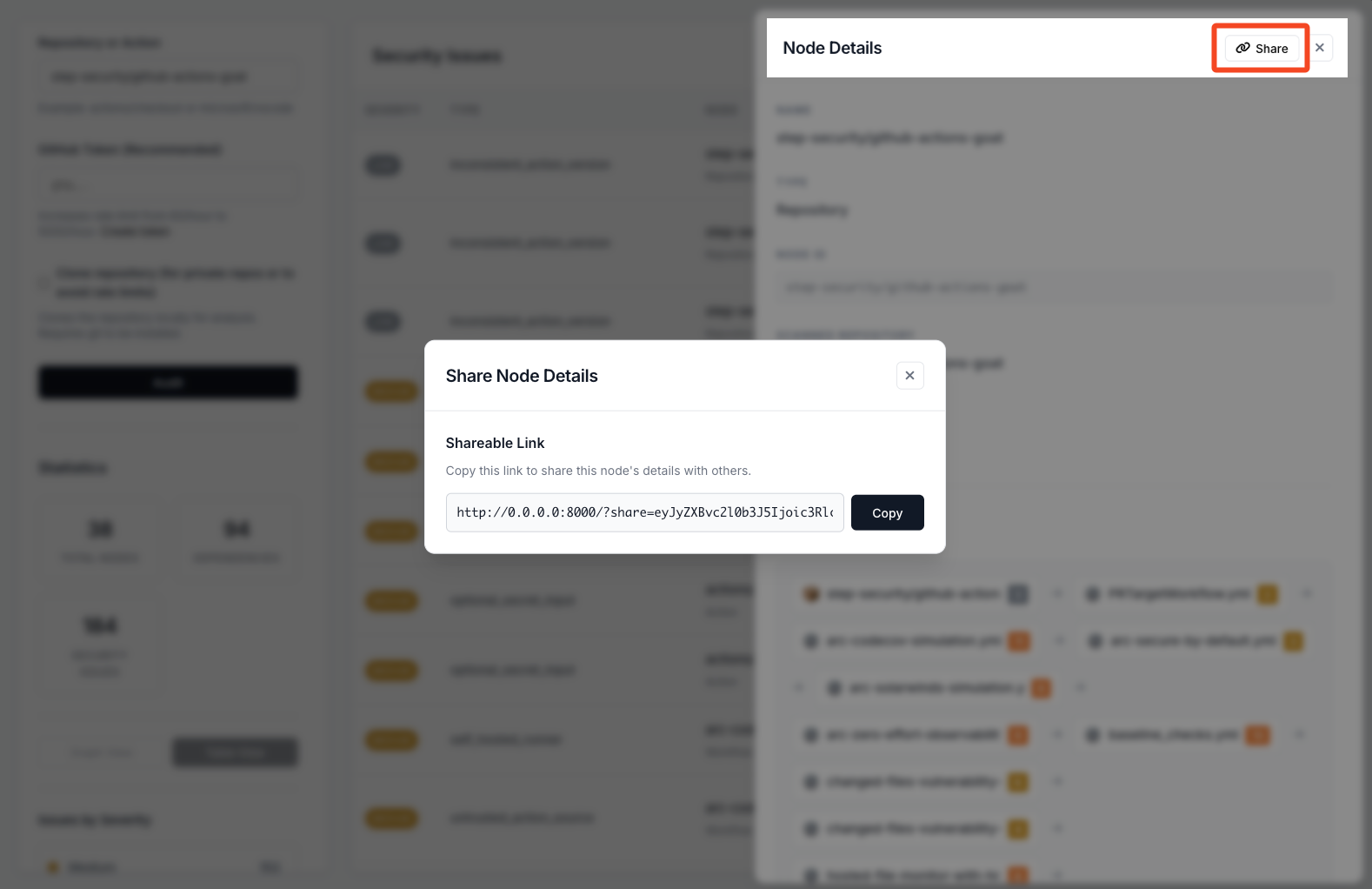
Generate shareable links for specific nodes or entire analyses. Share security findings with your team, stakeholders, or include in reports and documentation.
Multiple Analysis Methods
Choose how you want to analyze repositories:
- GitHub API: Fast analysis using GitHub’s API (requires token for private repos)
- Repository Cloning: Deep analysis by cloning repositories locally (more thorough)
- Secure Workflow Editor: Paste, analyze, and harden workflow YAML directly without a repository
Secure Workflow Editor
Analyze workflow YAML files directly without needing a GitHub repository. Use the secure editor flow to test workflow changes before committing and iterate quickly on remediation.
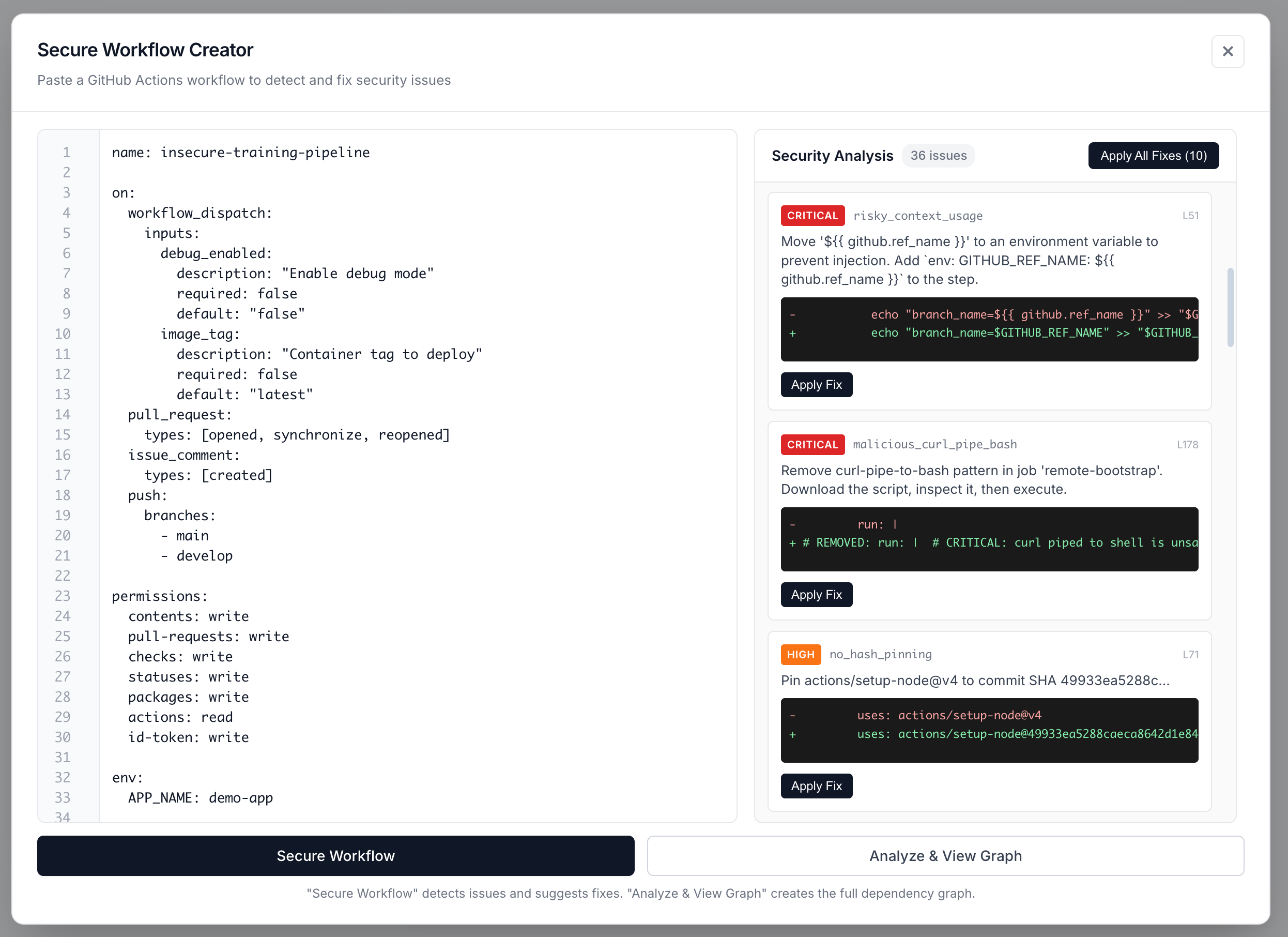
The Secure Workflow Editor lets you paste workflow content, run instant security analysis, apply fixes, and re-analyze in a tight loop.
Features:
- Direct YAML Input: Paste any GitHub Actions workflow YAML
- Real-time Validation: YAML syntax validation before analysis
- Line Numbers: IDE-like editor with line numbers for easy navigation
- Edit & Re-analyze: Save workflow state and iterate on security fixes
- Same Analysis: Full security audit with dependency resolution, just like repository analysis
- Error Display: Clear error messages for validation and analysis issues
How to use:
- Click the secure workflow editor entry in the sidebar
- Paste your workflow YAML content
- Click “Analyze Workflow” to run security analysis
- View results in the same graph visualization as repository audits
- Edit the YAML and re-analyze to iterate on fixes
The editor validates YAML syntax before analysis and displays clear error messages if validation fails. After successful analysis, the workflow content is saved so you can easily edit and re-analyze.
Analysis History
- Save analyses: Store audit results for later review
- Load previous analyses: Access your audit history
- Compare results: Track security improvements over time
Detailed Documentation
Each security issue includes:
- Clear descriptions: Understand what the vulnerability is
- Evidence: See exactly where and how the issue was found
- Mitigation strategies: Step-by-step guidance on how to fix issues
- External references: Links to comprehensive documentation on actsense.dev
Modern User Interface
actsense features a clean, professional interface built with React that provides:
- Intuitive navigation: Easy-to-use interface for exploring results
- Responsive design: Works on desktop and mobile devices
- Dark mode support: Comfortable viewing in any lighting condition
- Interactive controls: Zoom, pan, and filter the dependency graph
Key Features
Real-Time Analysis
Get instant security analysis results as you audit repositories and actions. The platform processes workflows in real-time and provides immediate feedback on security issues.
Dependency Resolution
actsense automatically resolves transitive dependencies, meaning it:
- Analyzes your workflows
- Identifies all actions used
- Recursively analyzes each action’s dependencies
- Builds a complete dependency graph
- Audits everything for security issues
Severity-Based Prioritization
Issues are categorized by severity to help you prioritize fixes:
- Critical: Immediate security risks requiring urgent attention
- High: Significant security concerns that should be addressed soon
- Medium: Moderate security issues to address in regular maintenance
- Low: Minor security concerns and best practice recommendations
Evidence & Recommendations
Every security issue includes:
- Evidence: Specific details about where the issue was found
- Line numbers: Exact locations in workflow files (when available)
- Recommendations: Actionable steps to fix the issue
- Documentation links: Deep links to comprehensive vulnerability documentation
Use Cases
Security Auditing
Regularly audit your GitHub Actions workflows to identify and fix security vulnerabilities before they can be exploited.
CI/CD Pipeline Security
Ensure your CI/CD pipelines are secure by analyzing all workflows and their dependencies for potential security risks.
Compliance & Best Practices
Maintain compliance with security best practices by identifying deviations from recommended configurations.
Supply Chain Security
Protect against supply chain attacks by identifying untrusted actions, outdated dependencies, and potential typosquatting.
Onboarding & Training
Use actsense to educate team members about GitHub Actions security by showing real examples of vulnerabilities in their workflows.
Getting Started
Ready to start using actsense? Check out our Getting Started guide for installation and setup instructions.